DOGAIN Digital Stylus Pen Touchscreen Pencil Apple Ipad KZ-02 313090122171
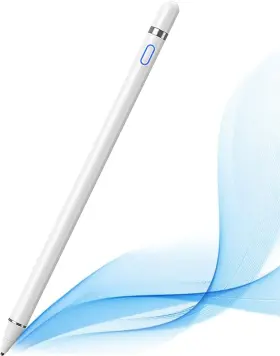
( Brand: Dogain ), ( Unit Count: 1 Count ), ( Item Dimensions L X W X H: 7.01 X 0.35 X 7.01 Inches ), ( Mfr Part Number: Kz-02 ), ( Are Batteries Included: Yes ), ( Compatible Tablet Computer Models: Apple Ipad ), ( Apple Ipad: 3rd Generation, Apple I ), ( Material: Aluminum ), ( Compatible Devices: Android, Smartphone, Tablet, Iphone, Ipad ), ( Item Weight: 17 Grams ), ( Color: White ), ( Battery Average Life Standby: 8 Hours ), ( Number Of Batteries: 1 Lithium Polymer Batteries Required. ), ( UPC: 313090122171 )
Review DOGAIN Active Digital Stylus Pen For Touchscreen Pencil Apple
Introducing the DOGAIN 313090122171 Digital Stylus Pen, a versatile and high-performing tool designed specifically for using on touchscreens, including the Apple iPad. This digital stylus pen is engineered to deliver an authentic writing experience, allowing you to draw, take notes, or navigate your digital devices with ease and precision.
Crafted with a sleek and ergonomic design, the DOGAIN Digital Stylus Pen fits comfortably in your hand. Its matte finish provides a secure grip, preventing the pen from slipping during use. The pen's slim barrel measures approximately 6.1 inches long and 0.3 inches in diameter, making it portable and convenient to carry in a bag or pocket.
Underneath its stylish exterior, the DOGAIN Digital Stylus Pen is packed with advanced technology. It comes equipped with 2048 levels of pressure sensitivity, enabling it to accurately replicate the feel and nuance of traditional pen and paper. This feature is particularly beneficial for artists and graphic designers, who can create detailed and expressive works on their touchscreens.
Additionally, the DOGAIN Digital Stylus Pen supports tilt recognition, allowing you to create shading effects and Gradient strokes just as you would with a traditional pencil. The pen also features a built-in rechargeable battery that can last up to 8 hours on a single charge, ensuring you have ample time to work on your projects without interruption.
The DOGAIN Digital Stylus Pen is compatible with various operating systems, including iOS, Android, and Windows. It pairs easily with your touchscreen device via Bluetooth or a USB connection, depending on the specific model. The pen comes with a detachable USB charging cable and a built-in stylus holder, allowing you to keep your pen protected and organized when not in use.
With its advanced features, comfortable design, and compatibility with multiple touchscreen devices, the DOGAIN 313090122171 Digital Stylus Pen is an essential tool for anyone looking to enhance their digital art, note-taking, or navigating experience. Whether you're an artist, student, or professional, this digital stylus pen is sure to meet your needs and exceed your expectations.
A Detailed Analysis of Buying a Wacom Digital Stylus Pen (Model number: Bamboo Folio Smart, 313090122171) for Touchscreen Drawing on an Apple iPad
Introduction:The Wacom Bamboo Folio Smart (Model number: 313090122171) is a popular digital stylus pen designed for use with touchscreens, including the Apple iPad. This pen offers pressure sensitivity, tilt recognition, and smart functionality, making it an attractive option for digital artists and note-takers. In this analysis, we'll discuss the pros and cons of buying this digital stylus pen for use with an Apple iPad.
Pros:1. Pressure sensitivity: The Wacom Bamboo Folio Smart pen offers 2048 levels of pressure sensitivity, allowing for a more natural drawing experience and finer control over stroke thickness.
2. Tilt recognition: This pen also supports tilt recognition, which enables shading and hatching by tilting the pen like a traditional drawing tool.
3. Smart functionality: The pen includes a side button, which can be programmed to perform various tasks, such as launching specific apps or opening the note-taking app.
4. Comfortable design: The pen has a comfortable, ergonomic design that reduces hand fatigue during extended drawing sessions.
5. Bluetooth connectivity: The pen connects to the iPad via Bluetooth, allowing for wireless operation and easy pairing.
Cons:1. Battery life: The pen requires a battery to function, which can be a drawback for some users who prefer a more traditional, battery-free stylus.
2. Compatibility: The Wacom Bamboo Folio Smart pen is primarily designed for use with Wacom tablets and not specifically marketed as an Apple Pencil alternative. While it does work with iPads, some users have reported inconsistent performance and compatibility issues.
3. Price: Compared to other digital stylus pens, such as the Apple Pencil, the Wacom Bamboo Folio Smart pen is more expensive.
4. Size and weight: The pen is slightly larger and heavier than the Apple Pencil, which may not be ideal for users who prefer a more compact and lightweight stylus.
Conclusion:The Wacom Bamboo Folio Smart pen offers several advantages for digital artists and note-takers, including pressure sensitivity, tilt recognition, and smart functionality. However, it also comes with some drawbacks, such as battery requirements, potential compatibility issues, and a higher price point. Ultimately, the decision to buy this pen depends on your individual needs, preferences, and budget.
Recommendation:If you're looking for a digital stylus pen with advanced features like pressure sensitivity and tilt recognition, and you're willing to accept the potential compatibility issues and higher price point, the Wacom Bamboo Folio Smart pen could be a good choice for you. However, if you prioritize a more seamless experience with your iPad and a lower price point, you may want to consider the Apple Pencil instead.
Details:
Please try to set up your iPad as follows: Setting ->Draw with finger, Can't write in Procreate. Please try to set up your iPad as follows:Setting ->Preferences ->Pen Connection ->Pen ->None Disconnect the Bluetooth connection between active pen/Apple pencil and before using stylus, Can't write in Coordinator. Great Feature This iPad active pens built-in battery provides 8 hours use while its fully charged with Micro USB in 60 minutes. Please try to set up your iPad as follows: Draw ->Drawing Mode ->Draw with touch Disconnect the Bluetooth connection between active pen/Apple pencil and before using stylus, S-Note on Samsung icon in upper right corner -> Settings -> turn offs Pen Mode only, Notes/ Yuan-Note Hawaii corner open Finger writing, then select a pen/brush write.
Accessibility functions Quick launch and gestures ->Screen capture screen recording Screen knuckle/three-finger slide must be turned off, otherwise it will affect the misprision of software. User-Friendly Design This iPad Pencil can be written directly on or iPhone, just pressing the button once Blue light on and you draw write your touch screen devices. Yes, Battery Average Life Standby 8 Hours, Charging Time Number of Batteries 1 Lithium Polymer batteries required. Included, Enclosure Material Aluminum, Manufacturer DOGAIN.
Precise Point Control These digital stylus pens is sensitive to pressure and tilt, so you can easily vary line weight, create subtle shading, it makes your iPad Pro even more powerful help be creative. More sensitive with long time wearing at best performance.Best Stylus for artist,journalist,teacher and students etc. Please try to set up your iPad as follows: info ->Apple Pencil ->Disconnect ->Start writing connect, Doesn't work on Note shelf. Please try to set up your iPad as follows: Setting ->Input ->Draw only with pencil Disconnect the Bluetooth connection between active pen/Apple and before using stylus, Can't write in One note.
Please try to set up your iPad as follows Setting ->Stylus ->Enable Disconnect the Bluetooth connection between active pen/Apple pencil and before using stylus, Can't write in Sketchbook. Charging input is 5V. Please try to set up your iPad as follows: Stylus Palm rejection ->Smart Status ->None, Doesn't work on Notes. Please try to set up your iPad as follows:Setting ->Stylus ->Enable, Doesn't work on Good notes.
About Active Stylus Fine, Light, Brief stylish design with 178mm length , 16.8g weight, 1.5mm tip for smoothly writing and drawing.: Some APP Settings: Doesn't work on Notability.
specifications stylusseeker:
- brand: Dogain
- unit count: 1 Count
- item dimensions l x w x h: 7.01 X 0.35 X 7.01 Inches
- mfr part number: Kz-02
- are batteries included: Yes
- compatible tablet computer models: Apple Ipad
- apple ipad: 3rd Generation, Apple I
- material: Aluminum
- compatible devices: Android, Smartphone, Tablet, Iphone, Ipad
- item weight: 17 Grams
- color: White
- battery average life standby: 8 Hours
- number of batteries: 1 Lithium Polymer Batteries Required.
- upc: 313090122171
seller stylusseeker:
- rating: 0.0%
- # reviews: 0
- city: Denver, Colorado
payments stylusseeker:
- wallet: Google-pay
- credit card: Mastercard
- other
offer stylusseeker:
- sold: 0
- availability: In Stock
- options: Ship-to-home
- started: April 15, 2026
- quantity: 1
general stylusseeker:
- condition: New
- Computers/Tablet's Networking > Tablet eBook Reader Accs > Styluses
shipping stylusseeker:
- class: Expedited
- transit: 2-5 Days
- service: Expedited
- type: Fixed
- cost: $0.00
returns stylusseeker:
- method: Money back
- paid by: Seller
- policy: Returns Accepted
- time: 30 Days
Dogain KZ-02 Is Similar To:
- Dogain 717675669318 Active Digital Stylus Pen For Android Ios Ipad ipad 2 new Ipad 3 ipad4 ipad (56.8% similar) Charging input is 5V. User-friendly design this ipad pencil can be written directly on or iphone, just pressing the button once blue light on and you draw write your touch screen devices. Precise point control these digital stylus pens is sensitive to pressure and tilt, so you can easily vary...(August 19th, 2024)
- Dogain Kz-02 Active Digital Stylus Pen For Touchscreen Pencil White (81.1% similar) Precise point control these digital stylus pens is sensitive to pressure and tilt, so you can easily vary line weight, create subtle shading, it makes your ipad pro even more powerful help be creative. Dogain active digital stylus pen for touchscreen, pencil white. Product features: great...(August 10th, 2025)
- Dogain 08d-b Stylus Pen For Ipad 9th10th Type-c Charging Pencil Palm Rejection (46% similar) Note pressure sensing is not supported. Power display/palm rejection the active stylus pen for ipad has 4 power indicators, each representing 25% power, so you can watch your battery consumption progress in real time recharge before important work begins. Note this ipad pen is not compatible...(November 16th, 2025)
- Dogain 769326714106 Stylus Pen For Ipad 10th11tha16 Type-c Charging Pencil Palm Reject (47.3% similar) Tilt sensitivity /pom tip the stylus pen has tilt sensitivity, which can simulate the different thickness of line texture when drawing with pencil on ipad notes, making painting more realistic. Note this ipad pen is not compatible with model's prior to 2018 , iPhone's, android or windows phone and...(November 17th, 2025)
- Dogain 769326838529 Stylus Pen For Ipad 10tha16 Fast Charge Pencil With Palm Rejection (46.7% similar) The ipad stylus has a sleep function. Tilt function / pom replacement nib the stylus pen can be based on your different writing angles, engraved with thickness of the line shading, high precision to restore real pencil. If there is any problem with the product. Battery indicator / type-c...(November 17th, 2025)
- Dogain D-us-08u Stylus Pens For Touch Screens Power-display Tablet Pen Pom Tip Magnetic Digital (48.9% similar) 4 light on indicates that the stylus battery is 75%-100%, 3 light 50%-70%, 2/2 5%-50%...(April 14th, 2026)
